


EBSCO online sessions in October 2025
Registrations for the training cycle organized by EBSCO designed for librarians, researchers, teachers and students, who would like to learn more about EBSCO.
- Publisher Session | Taylor & Francis
Exploring Open Access Publishing: Strategies for Successful Outcomes
15th October 2025, 11:00 AM–12:30 PM | Register
Increasingly, researchers are interested in or required to publish their work as Open Access. While the publishing process is essentially the same, Open Access publishing can offer the opportunity for greater impact and a more transparent process. This session will examine the publishing process and how to increase the likelihood of your work being published. We will cover Open Access models, licensing, how to choose a journal and avoid predatory ones, manuscript preparation, the submission process, and how to navigate peer review. Participants will walk away with a good understanding of what they can expect during the publishing process.
- New Nursing Databases in Practice!
15th October 2025, 1:30 PM | Register
Join the training to explore the new resources in the EBSCO collection: Nursing & Allied Health Reference Source and Dynamic Health. These databases provide an excellent source of information and practical guidance in nursing, healthcare, social work, occupational therapy, physiotherapy, rehabilitation, and related fields.
- Discover Business Source Ultimate on Its New Interface!
22nd October 2025, 11:00 AM | Register
Join the session to see how this powerful database goes far beyond journals and magazines. Learn how to quickly find SWOT analyses, company profiles, country reports, videos, and more – all in one place, tailored to business, management, and finance research.
- What’s New on EBSCO Platforms: Citations, AI Feature, and Natural Language Search
29th October 2025, 11:30 AM | Register
During the training, it will be reviewed the new feature launches on EBSCO platforms:
Citation Counts: powered by Scopus or the EBSCO Scholarly Graph.
AI Insights: provides AI-generated summaries of publications.
Natural Language Search: a search mode that allows users to enter queries in everyday language. Instead of relying on complex keywords or Boolean operators, this feature enables more conversational and intuitive searching.
To stay up-to-date with upcoming training sessions, we recommend that you bookmark this site and visit it regularly to sign up for any new trainings
Trial access to academic writing tool Writefull
The Writefull is a tool designed for academics and university students to proofread scientific texts. Writefull was primarily for the English language but now offers multi-language support by leveraging GPT models alongside its original English-language research model. The Writefull uses language models based on artificial intelligence (AI). The leading all-in-one tool to elevate your academic writing in Word, giving you the best language edits and a suite of powerful writing tools.
The following Writefull products are available during the trial:
- Writefull for Word, a plugin that offers corrections to a Word document you are writing. The plugin for Microsoft Word must be downloaded from the Writefull website. After installing the plugin, the Writefull icon will appear in the top toolbar of the Word document. Click on it and after creating a personal account, log in by clicking Sign in*.
- Writefull for Overleaf, which work directly while writing texts in Word and in the Overleaf LaTeX editor, respectively*.
- Writefull X – access Writefull online*.
- Writefull Revise service is available for analyzing already prepared texts*.
- Writefull Cite which helps identify cited passages in texts that are missing bibliography entries*.
* Registration is required using a Vytautas Magnus University email address. A single account is sufficient, and the same login details should always be used regardless of the tool.
or
It is possible to connect directly to Writefull using the e-mail address of Vytautas Magnus University for registration.
January 2025 webinar recording
The access for the University community is valid to 6 November, 2025
Painting exhibition „Organic“
We invite you to visit painting exhibition „Organic“ by Raminta Dagilienė, which is displayed in the library of Academy of Agriculture (Studentų g. 11-235, Akademija, Kaunas district).
About me:
For me, painting is a silent conversation with the world – a world without rules, only feelings. I create abstract art where dissolves and color become emotion.
Each work emerges slowly – from silence, intuition and inner impulse. As colors flow and merge, I do not look for answers, but questions – leaving space for the viewer’s interpretation. It is not what you see that matters, but what you feel.
I work mainly with acrylic on canvas, I am attracted to textures, layers and the beauty of the unexpected. Each work is unique, one-of-a-kind, born from the moment of creation.
I believe that art speaks when we are ready to listen. I invite you – to look, to stop, to feel.
Trial access to academic writing tool SciFlow
SciFlow is an online tool for collaborative scientific writing and publishing that allows to create, edit and format scientific articles and qualifying papers.
Researchers have the opportunity to create articles according to different templates and citation styles, i.e. AMA, APA, MLA, etc. The tool saves time with automatic formatting for thousands of journals. Completed articles can be exported as a PDF, MS Word, HTML file. SciFlow automatically checks spelling, depending on which language is selected.
Log in: http://sciflow.net/vdu
Registration is required using a Vytautas Magnus University email address.
The Help Centre is available here
The access for the University community is valid to 30 November, 2025
Taylor & Francis eBooks database opened for trial accsess
Taylor & Francis eBooks is a single destination platform with eBooks in science, technology, engineering, medical, humanities and social science. Access to the platform will allow users to: search ebook content at both the book and chapter level, filter search results by subject area, publication date and create citations in APA format. E-books available during the trial can be found by selecting Subjects or Browse – All books.
Log in: VMU computer network or Remote access
The access for the University community is valid to 16 November, 2025
Bloomsbury Collections ebooks database trial
Bloomsbury Collections offers excellence and originality in scholarship in the arts, humanities, and social sciences. The books available on the platform cover 45 subjects, such as art & visual culture, sociology, education, fashion, film and media, history, music & sound studies, religious studies, philosophy, linguistics, etc.
Log in VMU computer network or Remote access
The access for the University community is valid to 16 November, 2025.
Pie Day Initiative in VMU Agriculture Academy library
Pie Day Initiative in VMU Agriculture Academy library (Studentų St. 11-235, Akademija, Kaunas r.) on November 6, 10.00 – 12.00.
We kindly invite you to join us for a cup of tea and contribute to a noble cause – donate to the “Išsipildymo akcija” project supporting sick children.
Those who wish to contribute are invited to bring their own baked cake or other.
Let goodness spread from heart to heart!
Organizers : VMU Agriculture Academy library
Tradition continues: Komaru Kotsu Foundation gift for the library
On September 23rd, a donation ceremony of Komaru Kotsu Foundation books took place in the Senate Hall of Vytautas Magnus University. The event was attended by a delegation led by Honorary Consul General of the Republic of Lithuania in Japan and President of Fukuyama Transporting Mr. Shigehiro Komaru.
The Komaru Kotsu Foundation, which aims to further stimulate interest in Japanese studies, donated valuable publications to the library. Among them, as has become a tradition, is not only academic literature useful for studies and books adapted to students’ language level, but also Japanese comics – manga – popular around the world. These books contribute to the information supply of the East Asian Studies programme and help students get to know the Japanese language and culture even better. Soon, all new books will be available not only to the university community, but also to anyone interested in Japanese culture and language.
New Data Visualization Capabilities in VDU CRIS
In June 2025, Vytautas Magnus University successfully implemented the latest version (8.1) of the open-source DSpace–CRIS software, which serves as the core platform for the University’s research information management system (VDU CRIS). One of the key new features of this version is an advanced data visualization tool, designed to support more effective analysis and presentation of academic activities.
Key visualization features in the new VDU CRIS version:
- Dynamic charts that update in real time;
- Users can:
- Filter data according to selected criteria (e.g., time period, document type, publication category, scientific field, full-text access rights, etc.);
- View detailed information – by clicking on a specific chart element, related data is displayed.
Visualizations are generated based on the selected research entity. The currently available visualization groups in VDU CRIS include:
- Publications:
- Visualized by document and publication type, date, country of publication, language, scientific field and subfield, Sustainable Development Goals (SDGs), indexed databases, and full-text access rights.
- Electronic Theses and Dissertations (ETDs):
- Visualized by thesis type, date, scientific and study field, study program, and access rights.
- Research data:
- Visualized by data type, date, country, language, scientific subfield, repositories and databases, and access rights.
- Projects:
- Visualized by project start date, scientific field, RDI result, RDI type, funding type and source, project scope, and economic sector.
Users can generate custom diagrams by applying filters and search criteria tailored to their individual needs and analytical goals.
How to generate visualizations in VDU CRIS?
- In the VDU CRIS (https://vdu.lt/cris) system, select the research entity of interest, such as:
- Publications
- Electronic Theses and Dissertations (ETD)
- Research Data
- Projects
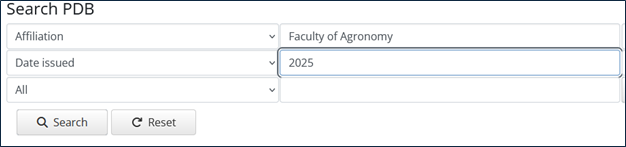
- Perform a search based on your selected criteria, for example: Publications of the Faculty of Agronomy in 2025.
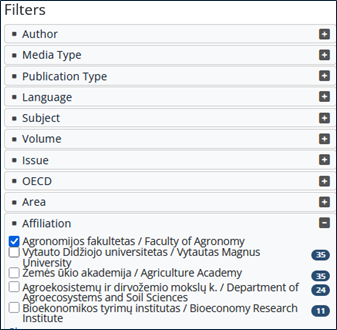
- You can also select filters (on the left side of the window) to narrow down the search results.
- Click the “Show/Hide” button located above the list of search results — a list of available visualizations will appear at the top of the page.
- Click on the link of the desired visualization, and the corresponding chart will be displayed — for example, a visualization of the Faculty of Agronomy’s 2025 publications by publication type.
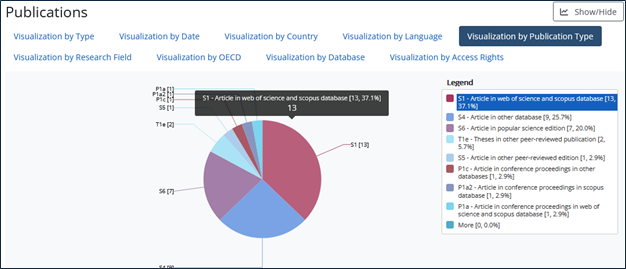
- By clicking on any chart element of interest, a new chart will be generated, providing more detailed information about the selected element. Below the chart, a corresponding filtered list will be displayed. For example, if you click on the “Articles in Web of Science and Scopus databases” element in the publication type visualization, a new chart will appear along with a list of publications matching that criteria.
VDU CRIS visualizations are a powerful tool that enables users to visualize and analyze dynamic data, offering interactive exploration and supporting informed decision-making.
Virtual Library – one search box for all resources
We invite you to get acquainted with the VMU Virtual Library. It is a unified search platform that allows users to search for information in one place from a variety of sources: the library catalogue, subscribed databases, the Research Management System (VDU CRIS), digital archives and global open access resources. This greatly facilitates and speeds up the search for the information you need, and avoids having to search each information source separately.
The main advantages of the Virtual Library for users are:
One search box: the ability to search for different types of documents (books, articles, conference proceedings, theses, etc.) on one platform.
Diverse search results: users can easily find both physical library collections and electronic resources.
User-friendly management: Users can view and manage their order list in their Reader account; view the list of borrowed titles and return dates; extend the return period of borrowed titles; view the borrowing history of titles; and send search results to bibliographic information management applications.
- A-Z
- About Interlibrary Loan (ILL):
- About library
- All books
- All news
- Ask, write, call
- Changes in the work of the library
- Compensatory equipment
- Computers and other equipment
- Contacts
- Databases
- EndNote
- Equipment
- Excursions and events
- F.A.Q
- Feedback about the library
- For research
- For studies
- Home page
- How to use information in compliance with copyright
- Interlibrary Loan Request
- Lina Bloveščiūnienė, Library Director
- Open Educational Resources
- Opening hours
- Purpose, amount, ways of payment of the fines:
- Resources
- Responsible persons
- Rules
- Self-service system of copying, printing and scanning
- Services for users with disabilities
- Settlement with the University:
- Software
- Suggestions for acquisition
- Text originality checking
- User service departments of Vytautas Magnus University Library 2024
- User Services Department
- VMU peer-reviewed scientific journals
- Workplaces
- Information resources
- Printing services order
- Catalog of publications
- Purchase and access